VPS

If your experience takes more than a breath to anchor itself to the world, users feel it. They wiggle the device, glance at a clock, and their trust starts to slip. In enterprise scenarios - field service, training, guided picking, digital twins - trust is currency. Projects stall not because the 3D model isn’t pretty, but because the device can’t localize fast and reliably enough. This post distills practical guidance from shipping across complex environments and lays out a clear playbook for AR cloud localization that gets you a lock quickly, keeps you locked under real‑world noise, and scales from a single room to multi‑floor campuses.
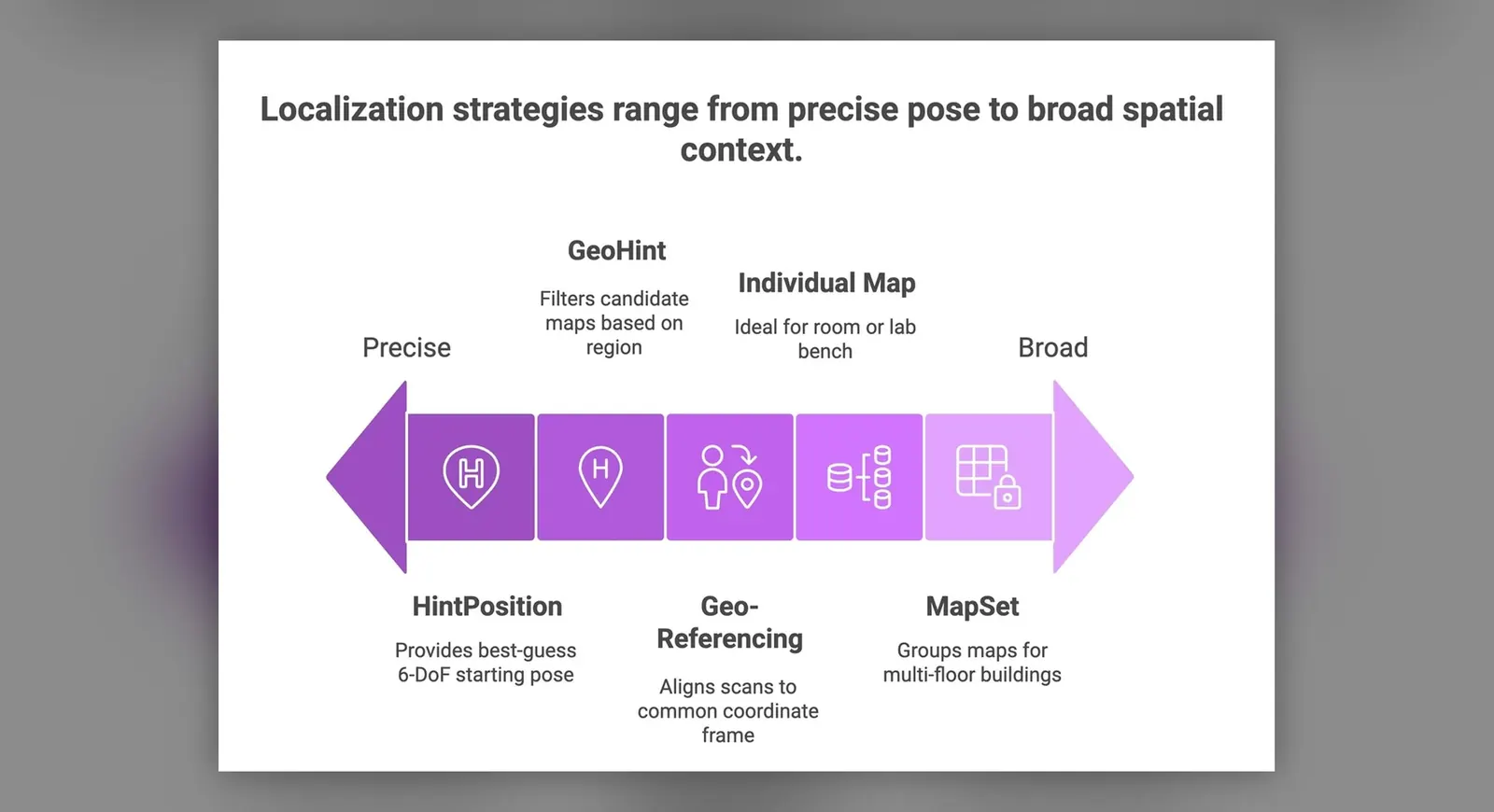
MultiSet’s philosophy is simple: there isn’t one magic setting. The environment changes, the user’s starting viewpoint changes, and network conditions change. So the system must be adaptive. MultiSet provides that adaptability by making Multi‑Frame localization the default for robust first‑locks, while giving you the option to rely on Single‑Frame one‑shot queries for ultra‑fast re‑locks in compact, well‑scanned spaces. Add GeoHint and HintPosition to shrink the search space and you’ve got a reliable first‑lock that feels instantaneous to the user.
TL;DR: Start robust with Multi‑Frame by default, use Single‑Frame for micro re‑locks, and accelerate both with GeoHint and HintPosition. Build your content on Individual Maps for rooms and MapSets for buildings/campuses. All of this runs on cloud for fast, scalable localization.
If you prefer to read the docs while you go, keep these open:
Every AR workflow depends on a stable origin. Miss the first‑lock and everything downstream - UI prompts, guidance, occlusion, collision - becomes guesswork. The failure modes show up as support tickets and “it doesn’t work here” rumors:
The fix is not a single algorithm - it’s a system behavior: how your app escalates evidence, narrows search, and guides the user. That’s what the rest of this post is about.
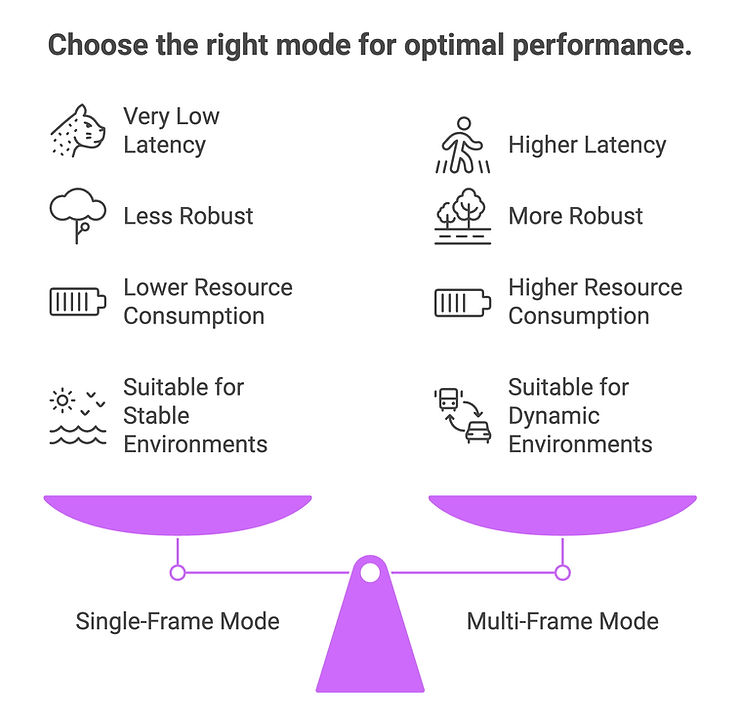
Multi‑Frame (default) accumulates evidence across a short rolling window of frames. It tolerates imperfect first views - weak texture, motion blur, partial overlap - and trades a bit of latency for a much higher probability of a correct lock.
Single‑Frame is a one‑shot query. When the first view overlaps strongly with the map and the space is compact and unambiguous, Single‑Frame can return in milliseconds, making it ideal for frequent relocalizations during a task.
Neither is universally better. MultiSet’s job is to give you the flexibility to pick the right mode for the moment - and to blend them automatically based on telemetry.
| Scenario | Recommended mode | Why & Typical latency envelope* |
|---|---|---|
| Cold start in a new session; user may point anywhere | Multi‑Frame (default) | Tolerates poor initial overlap, blur, repetitive structure Higher than Single‑Frame; varies with network + frame budget |
| Frequent relocalizations (occlusion, brief loss) | Single‑Frame, fallback to Multi‑Frame | Ultra‑fast re‑lock; escalate if miss Very low (often ms → low hundreds ms) |
| Small/compact areas (demo booth, kiosk) with good texture | Single‑Frame | Stable viewpoints and high overlap make one‑shot ideal Very low |
| Large indoor/outdoor or multi‑floor sites | Multi‑Frame + GeoHint/HintPosition | Aggregation improves confidence across varied visuals Higher |
| Low light / motion blur / dynamic crowds | Multi‑Frame | Temporal evidence smooths noise and occlusions Higher |
| Battery/thermals constrained; environment is distinct | Single‑Frame | Less compute/uplink per attempt Very low |
*Latency varies by device, uplink, map size, and frame budget. Instrument and tune for your SLOs.
Where to read more while you implement:
Robust localization is not only about how you search, but where and from where you start searching.
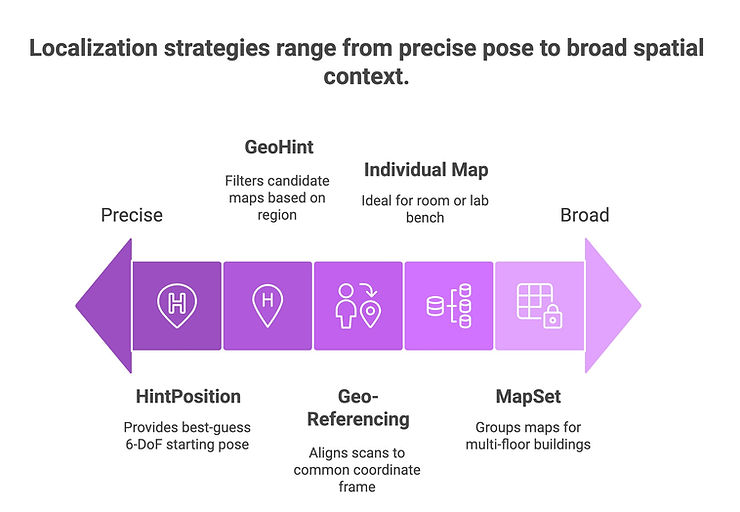
Recommended flow: Start Multi‑Frame. If there’s no lock within your budget, inject HintPosition (if available) and ensure GeoHint is set. Continue aggregating frames; if needed, prompt that small sweep. The combination of a spatial prior (GeoHint) and a pose prior (HintPosition) is multiplicative: less search, faster locks, fewer false positives.
Edge cases to note:
Scaling beyond a single room requires two design choices: aligning your scans to a global frame, and structuring your map content for handoffs.
Geo‑Referencing 101
When scans are aligned to a common coordinate frame, device sensors (IMU, compass, GPS where available) and GeoHint compose correctly, and the whole system “thinks” in the same spatial language. Misalignment is a silent tax on time‑to‑lock. Start here: https://docs.multiset.ai/fundamentals/georeferencing-maps/how-to-align-scans
Individual Map vs MapSet
Operational discipline for scale:
You can run everything here with on‑cloud localization for first‑locks and re‑locks, while the device maintains visual‑inertial tracking between locks. This balances performance and battery with the convenience of cloud maps and updates.
Recommended patterns:
Network pragmatics:
Observability (treat these like SLOs):
These signals tell you when to adjust thresholds, when to shift the Single‑Frame/Multi‑Frame balance, and where to refresh content.
Read the core concepts in the overview: https://docs.multiset.ai/unity-sdk/ar-foundation/on-cloud-localization
Benchmarks are snapshots, not guarantees. Your device model, optics, network, lighting, and crowd dynamics all influence outcomes. The right expectation setting helps your stakeholders evaluate progress without chasing vanity numbers.
How to present results credibly:
Remember the end goal: a perceptually instant, reliable first‑lock. Whether that’s 300 ms or 1.8 s depends on your context; what matters is that it’s consistent and that the app communicates clearly during the brief ramp.
Even a strong system hits rough edges. Here’s a quick triage that has saved teams hours onsite:
Symptoms → Likely causes → Practical fixes
A few pro‑moves:
1) Service tech in a brightly lit lobby
The user opens the app under skylights and LED signage. Start with Multi‑Frame plus a GeoHint for the building. The first view includes reflections and motion - Multi‑Frame smooths that noise and locks confidently within your budget. Once attached, the app runs locally. If the tech looks away to consult paperwork and returns, a Single‑Frame re‑lock snaps the content back instantly.
2) Pick/Pack in a warehouse with repetitive shelving
Repetition and symmetry can confuse a one‑shot. Start Multi‑Frame with a HintPosition from the last pick and a GeoHint for the site so the system narrows the search. If a lock stalls, the app nudges a 20° sweep. Between bins, Single‑Frame re‑locks keep the flow snappy, while MapSet handoffs ensure the experience continues cleanly across zones.
3) Training demo at a conference booth
Space is compact, lighting is manageable, and the backdrop is consistent. This is Single‑Frame heaven. Use Individual Map content. The experience feels instant, and because the camera often starts on the same view, re‑locks occur in a blink. If the booth gets crowded and motion blur increases, let Multi‑Frame catch misses quietly.
Q: When should I use Single‑Frame vs Multi‑Frame?
Start Multi‑Frame for robust first locks in imperfect views. Use Single‑Frame for ultra‑fast re‑locks and in compact areas with strong overlap. Blend them based on your latency budget and telemetry.
Q: What’s the difference between GeoHint and HintPosition?
Q: When do I move from Individual Maps to MapSets?
Q: Can I localize on cloud and then work offline?
Q: How do I communicate state to the user without breaking immersion?
Your users shouldn’t have to think about localization. With Multi‑Frame by default, Single‑Frame where it shines, and the right priors, they won’t.